Documentation
Supported sites, step-by-step instructions, troubleshooting, and version details — all on one page.
Supported Sites
The extension detects supported product pages. Look for the “Try It On” floating button.

Amazon
amazon.com, and all regional subdomains.

Temu
temu.com and all regional subdomains.

Lululemon
lululemon.com, lululemon.com.hk, and all regional subdomains.
ASOS
asos.com and all regional subdomains.
Nike
nike.com and all regional subdomains.
Target
target.com and all regional subdomains.
Zara
zara.com and all regional subdomains.
Shein
shein.com and all regional subdomains.
Supported Clothing Types
The extension supports these clothing categories:
Tops & Shirts
Shirts (dress shirts, casual shirts)
T-shirts
Polos
Sleepshirts
Tank tops
Crop tops
Halter tops
Tube tops
Camisoles
Bodysuits
Blouses
Tops (general)
Peplum tops
Wrap tops
Off-shoulder tops
Bottoms
Trousers
Pants
Jeans
Sweatpants
Joggers
Chinos
Cargo pants
Leggings
Shorts
Skirts
Dresses & Gowns
Dresses
Gowns
Nightgowns
Wrap dresses
Outerwear
Jackets
Blazers
Bomber jackets
Coats
Overcoats
Trench coats
Sweaters
Cardigans
Hoodies
Pullovers
Sweatshirts
Other
Robes
Kimonos
How to Use
Step 1: Install the Extension
Install from the Chrome Web Store. The extension appears in your browser toolbar.
Step 2: Navigate to a Product Page
Visit a product page on Amazon, Temu, Lululemon, ASOS, Nike, Target, Zara, or Shein. Works with:
- Shirts, T-shirts, Polos, Blouses, Tops, Tank Tops, Crop Tops, Halter Tops
- Trousers, Pants, Jeans, Leggings, Sweatpants, Joggers, Chinos, Cargos
- Skirts, Shorts
- Dresses, Gowns, Nightgowns, Wrap Dresses
- Jackets, Coats, Sweaters, Hoodies, Cardigans, Pullovers
- Robes, Kimonos
- And other clothing items
Step 3: Click “Try It On”
On a supported product page, click the floating “Try It On” button in the bottom-right corner to open the virtual fitting room.
Step 4: Sign In
Sign in with your Google account to access the try-on feature.
Step 5: Upload Your Photo
Upload photos from your computer, or tap the phone icon to scan a QR code and upload from your mobile device. Choose from your saved photos in the carousel.
Supported formats: JPEG, PNG, GIF, WebP, HEIC, HEIF, BMP, SVG
Maximum file size: 10 MB per image
Step 6: Select Your Photo & Generate
Choose one of your uploaded photos, then click “Generate Try-On”. The AI processes your image and creates a virtual try-on result.
Step 7: View & Compare Results
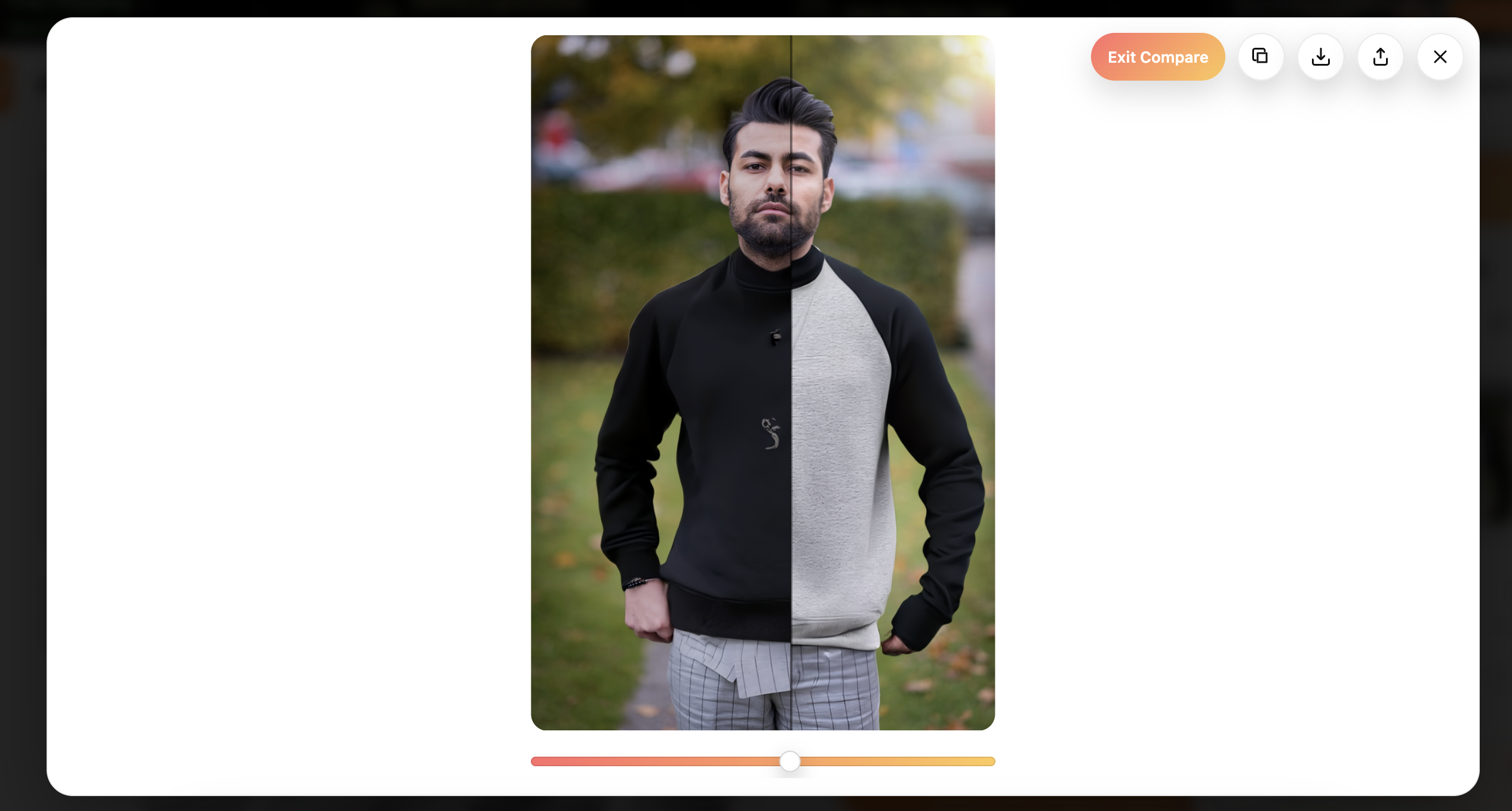
After generation, your try-on appears on the results page in a two-column grid. Tap any result to open the full-screen gallery, compare with your original photo via slider, and browse your recent history. Use Try again (shown briefly after a successful run) to regenerate on the same product.
Try-On History
The extension keeps your five most recent try-on results. Access them from:
- The history button in the fitting room while uploading a photo
- See Results in the extension toolbar popup (when you have results)
- The results grid after each successful generation
Older results roll off when you generate new ones beyond the five-result limit. This is separate from the daily generation limit below.
Mobile App Waitlist
We're building a TryB4Buy mobile app. Join the waitlist inside the extension to get notified at launch:
- Join waitlist in the toolbar menu (after "How It Works")
- The bell icon on the product page row in the toolbar popup
- The waitlist banner on the try-on results page (after your first result loads)
Sign in with Google is required. Once joined, waitlist prompts are hidden automatically.
Extension Toolbar
Click the TryB4Buy icon in your browser toolbar to open the popup. Available actions include:
- Try on this item — opens the fitting room on the current product page
- See Results — jump to your recent try-ons (when available)
- Pause / Resume TryB4Buy — temporarily hide the floating button
- How It Works — quick in-popup guide
- Join waitlist — sign up for the mobile app waitlist
- Leave feedback — opens the feedback form
Photo Requirements for Best Results
The extension shows a tooltip with these guidelines:
Single person only
No group photos — the AI works best with photos containing only one person.
Full body visible
Head to feet in frame — ensure your entire body is visible from head to toe.
Front-facing pose
Facing the camera — stand facing forward for the best results.
No sitting down
Standing pose preferred — standing photos produce more accurate try-on results.
Usage Limits
Important information about try-on generation limits:
Try-On Limit
Users are limited to 5 try-on generations per 24-hr period. Choose your photos and products carefully to make the most of your tries.
This limit helps ensure fair usage and optimal performance for all users. Each successful generation counts toward your limit. Your five most recent results are kept in history regardless of when they were created.
Screenshots
See TryB4Buy in action. These screenshots show the key features and interface of the extension.
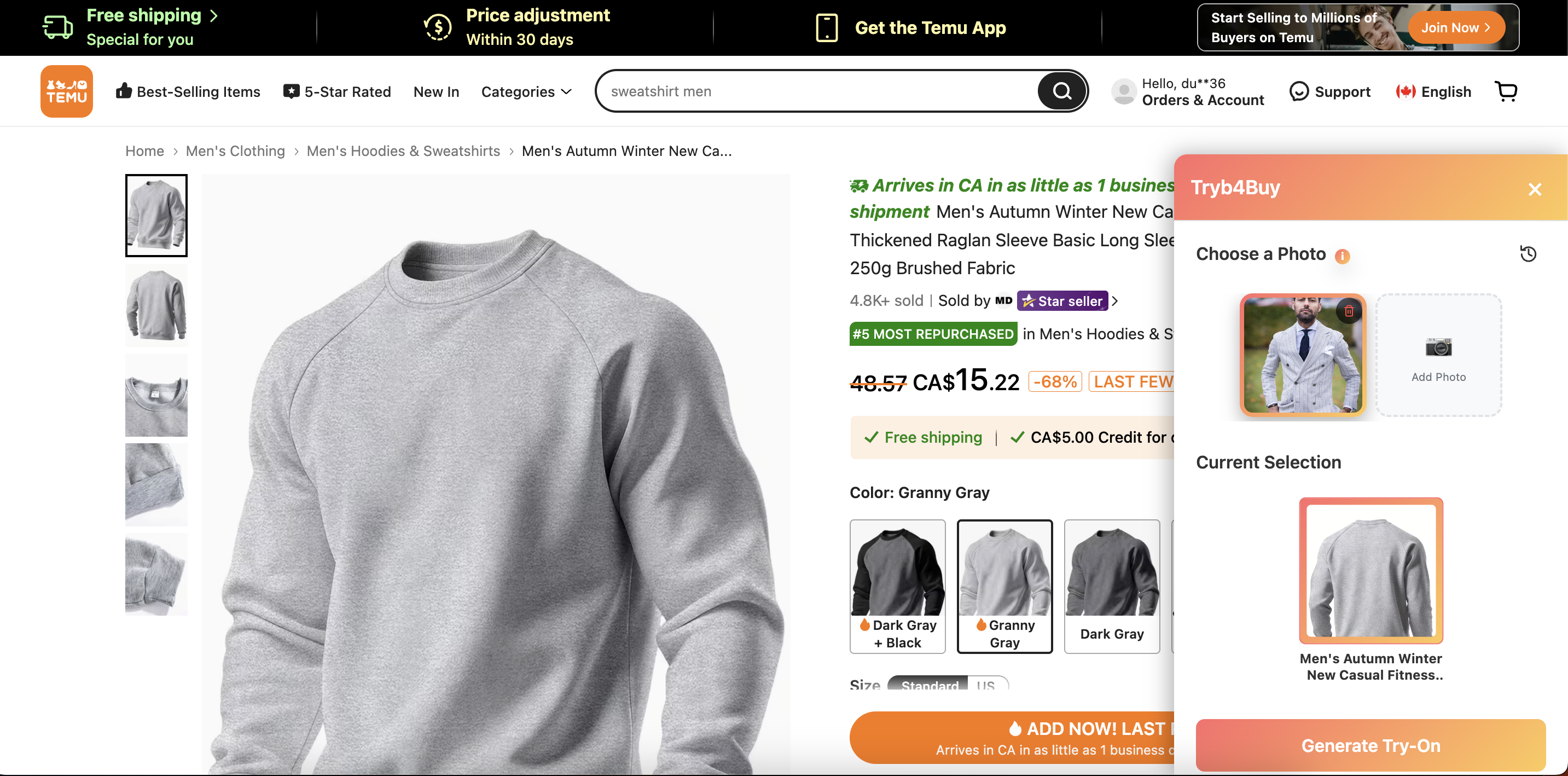
Try-On Popup Interface
The popup that appears when you click "Try It On". Upload your photos and select the clothing item you want to try on.
AI-Generated Try-On Result
See how the AI seamlessly applies clothing to your photo. The result shows a realistic visualization of how the item looks on you.
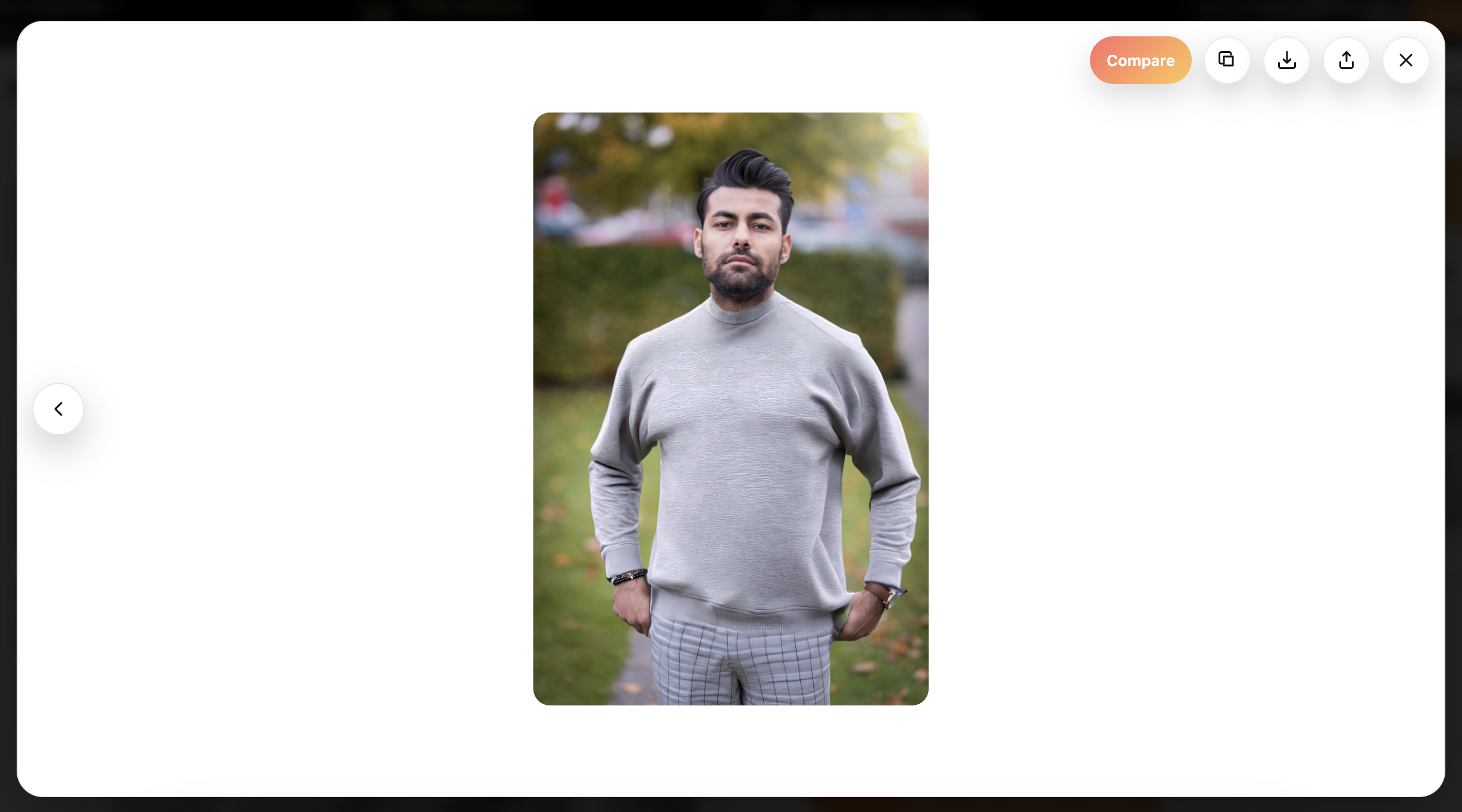
Compare Before & After
Use the comparison view to see your original photo side-by-side with the AI-generated try-on. Navigate between results and download your favorites.
Who Is This Best For?
Online Shoppers
Reduce returns and make confident buying decisions by seeing how clothes look before purchasing.
Fashion Enthusiasts
Experiment with different styles and see how various items complement your look.
Time-Saving Shoppers
Quickly preview multiple items without physical try-ons or returns.
International Shoppers
See how items look before ordering from international retailers where returns are difficult or expensive.
Gift Buyers
Ensure items will look good on the recipient before purchasing.
How to Leave Feedback
We value your feedback. Share your thoughts, suggestions, or report issues.
Submit Feedback: Click here to open the feedback form
- Click "Join waitlist" in the toolbar popup menu
- Click the "Leave feedback" button in the toolbar popup
- Click the "Leave feedback" link on the results page
About
Version Information
- Version: 1.0.3
- Technology: AI-Powered Virtual Try-On
- Platform: Chrome Extension (Manifest V3)
- Last Updated: June 2026
Features
- Real-time virtual try-on using AI
- Support for multiple clothing categories
- Full-screen gallery with before/after compare slider
- Last-five try-on history with results grid
- Phone photo upload via QR code
- Mobile app waitlist (toolbar + results page)
- Extension toolbar: pause, see results, feedback
- Works on 8 major e-commerce platforms
- Secure Google OAuth authentication
System Requirements
- Google Chrome browser (latest version recommended)
- Active internet connection
- Google account for authentication
Privacy & Security
Photos uploaded for virtual try-on are processed securely and used only for generating try-on results. We do not share your personal information or photos with third parties without your explicit consent.
If you encounter issues or have questions, use the feedback option above. We aim to respond within 48 hours.
Troubleshooting
Upload fails
- Check that your image is under 10 MB
- Ensure the file format is supported (JPEG, PNG, GIF, WebP, HEIC, BMP, SVG)
- Try a different image
- Check your internet connection
Try-on generation fails
- Ensure you're signed in with Google
- Check your internet connection
- Try refreshing the page and generating again
- Contact support via feedback if the issue persists
Changelog
Version 1.0.3 (June 2026)
- Mobile app waitlist — join from toolbar menu or results page
- Try-on history stores your last 5 results (quantity-based)
- Redesigned results page with two-column grid
- Full-screen gallery with compare slider
- Phone photo upload via QR code
- Toolbar updates: See Results, Pause/Resume, Join waitlist
- Permanent try-on result storage for reliable history
- UX polish: loading states, try-again shortcut, font consistency
Version 1.0.0 (January 2025)
- Initial release
- Support for Amazon, Temu, Lululemon, ASOS, Nike, Target, Zara, and Shein
- Virtual try-on functionality
- Photo upload and management
- Result comparison and sharing
- History tracking